

On October 21, Microsoft published its analysis of the ConnectWise Cloud Backup compromise. What caught my attention was not the attribution or the AI tooling, but the way in. Microsoft observed a large password spray campaign without a single successful sign-in. The access that mattered came from applications that customers had already trusted.
What happened
Microsoft attributes the activity to Storm-0940, a China-state aligned actor active since 2021. The actor used ARTEX, an open-source agentic AI penetration testing framework, to automate reconnaissance, password spraying and OAuth application abuse.
Here is the sequence as Microsoft describes it:
Password spray first. Between October 10 and 14, infrastructure tied to the actor sprayed accounts across several organizations. Microsoft saw no successful authentication.
Then the vendor. On October 15, public reports of the ConnectWise compromise listed indicators in the same IP range. ConnectWise’s advisory on October 16 included an IP matching exactly the one used in the spray. That infrastructure overlap is how Microsoft links the two.
Authentication as the application. After the actor gained control of the identities of several ConnectWise cloud applications, the agents authenticated into customer environments through those applications. No interactive user sign-in was needed.
Follow-on activity. In some environments Microsoft saw Graph reconnaissance, application credential modifications for persistence, and changes involving identities, groups and privileged roles.
Speed. Across the ARTEX-driven attacks, there were multiple cases where it took less than three hours from first targeting to privileged access.
Two caveats from Microsoft. This was not caused by a vulnerability in Microsoft products. And the presence of an affected application, or even a successful authentication, does not by itself mean data was accessed. Microsoft’s analysis also does not describe how the vendor-side credentials were obtained.
Microsoft warns about one more thing. In the victim environments, the actor modified application credentials, and these changes can lead to persistence through other identities, credentials and cloud services. They can stay active as a backdoor even after the original compromised application has been remediated. Disabling the vendor’s app is therefore not enough. You also have to look for what was changed.
Three groups of applications
In practice, I split the enterprise applications in a tenant into three groups, based on who owns the app registration:
Microsoft first-party applications.
Applications whose app registration lives in our own tenant.
External, multi-tenant applications, created in the tenant of a partner or service provider.
ConnectWise belongs to the third group, and that is the problem. For these applications somebody else manages the credentials. The service principal in our tenant is only the local representation of the app. If someone abuses the vendor’s application, the trust we granted at consent time works for them in every tenant that consented.
That is why the Microsoft write-up describes the actors as taking advantage of trust already established by these apps. Let’s look at what we can control.
Limit what the app can do
Backup applications need broad permissions, because they must reach every service we back up. To restore, they also need write permissions.
Do we need write permissions standing, when a restore happens rarely or never?
My suggestion is to review every permission at consent time and ask whether it is really needed. For write permissions, apply the just-in-time idea: grant them when a restore is planned and remove them afterwards. This takes testing and a documented process, and not every vendor supports it smoothly. But if an attacker holds the app’s identity, the difference between read and write is the difference between a bad day and a very bad one.
Microsoft’s own mitigation guidance for this incident includes applying least privilege to multi-tenant application permissions and consent grants. To understand what a specific permission allows, I use Merill Fernando’s Graph Permissions Explorer.
Enhance security with the principle of least privilege | Microsoft Learn
Conditional Access for workload identities
A workload identity is an application or service principal accessing resources. It cannot do MFA. Conditional Access for workload identities lets us restrict where a service principal can sign in from, for example by blocking sign-ins from outside known locations. If an attacker steals the credential of one of our own applications, they still cannot use it from an untrusted network.
There are important limits:
It applies to single-tenant service principals registered in our tenant. Microsoft and third-party SaaS applications, including multi-tenant apps, are not covered. Managed identities are not covered either.
It requires Workload ID Premium licenses.
The policy must target the service principal directly. Assigning it to a group containing the service principal is not enforced.
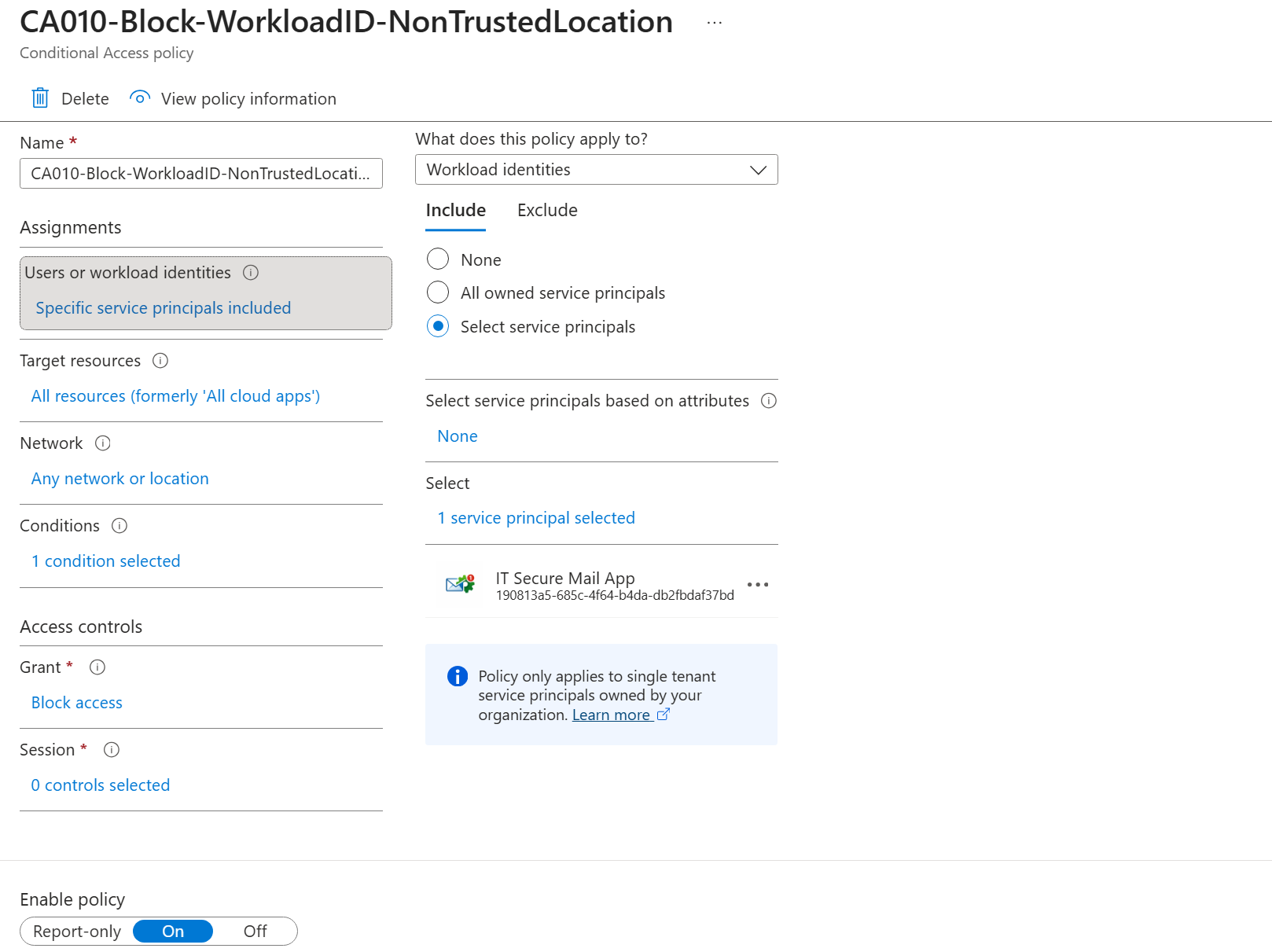
A policy cannot protect an application like ConnectWise Cloud Backup. But it raises a question: for integrations that a partner builds for us, can the app registration live in our tenant? Then we own the credentials and we can apply Conditional Access. For SaaS products such as a backup service, that is not realistic, and limiting permissions matters even more.
Conditional Access for workload identities | Microsoft Learn
Credentials: stop using secrets where possible
A client secret is the weakest credential option. Microsoft’s guidance is a clear order: managed identity where the workload runs in Azure, federated credentials (workload identity federation) where it does not, and certificates if neither is possible. Microsoft advises not to use password credentials at all.
In my view secrets belong only in short-lived pilots and development.
We can enforce this with application policies (Entra admin center > Enterprise apps > Application policies). With Block password addition we stop new secrets being created, whether the person is an owner or an administrator. This also matters for external apps, because secrets can be added to them by default.
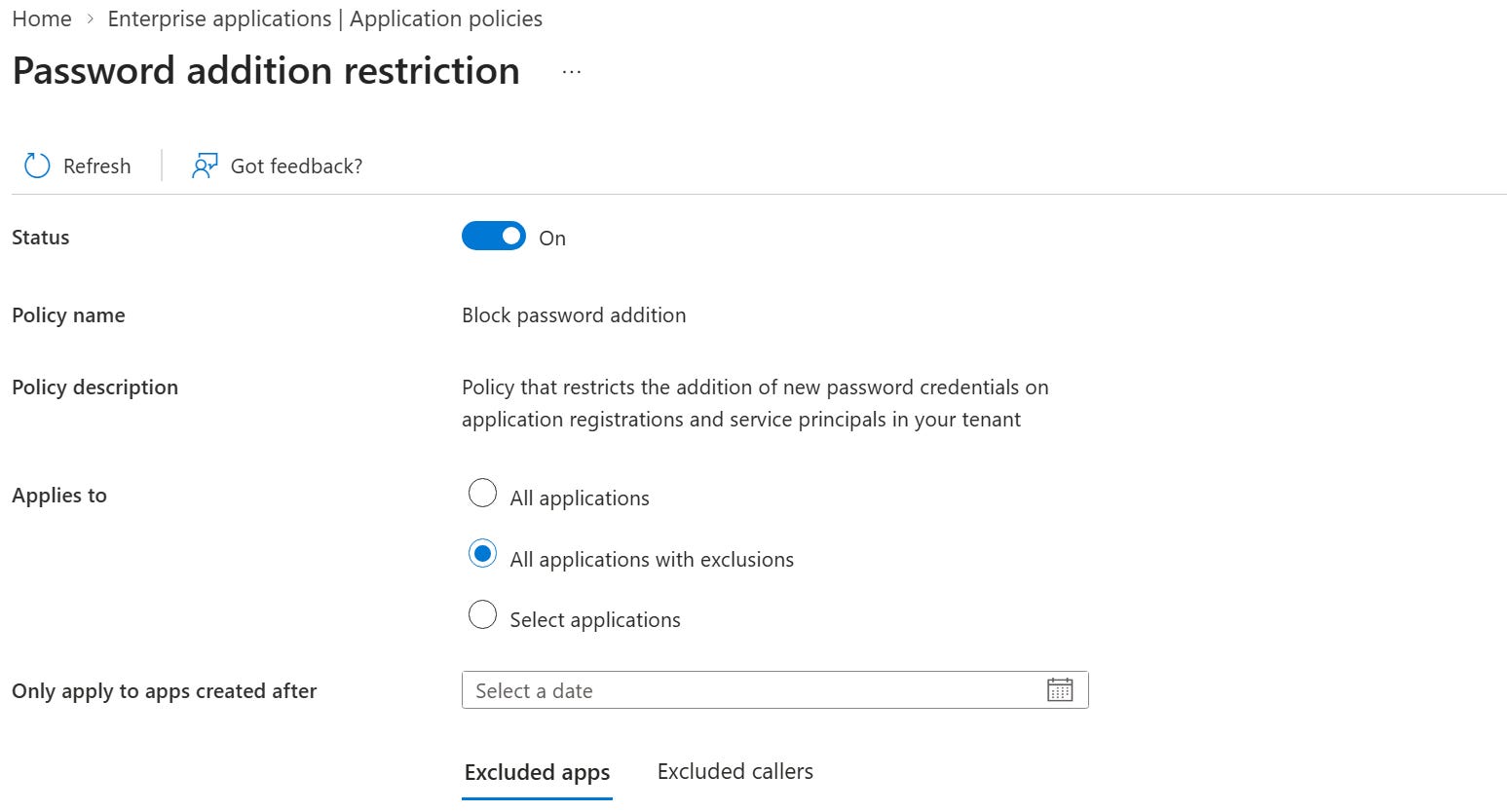
When a new secret is really needed, I suggest an exception: temporarily assign an app-specific policy to that application, then remove it afterwards. Again, just-in-time, not a standing right.
NOTE: The policy blocks creating or updating credentials that violate it. Existing applications keep working, and existing secrets are not removed.
Configure restrictions on how applications can be configured | Microsoft Learn
Finding the risky applications
Entra ID on its own does not give a good view by privilege, origin and inactivity. I recommend starting with app governance in Microsoft Defender for Cloud Apps, if the license is available. It shows whether an app originated in our tenant or in an external one, how privileged it is, and whether it is in use. Under Microsoft Defender XDR > Cloud Apps > App governance we get filters for high-privilege apps, unused apps and apps with unused permissions.
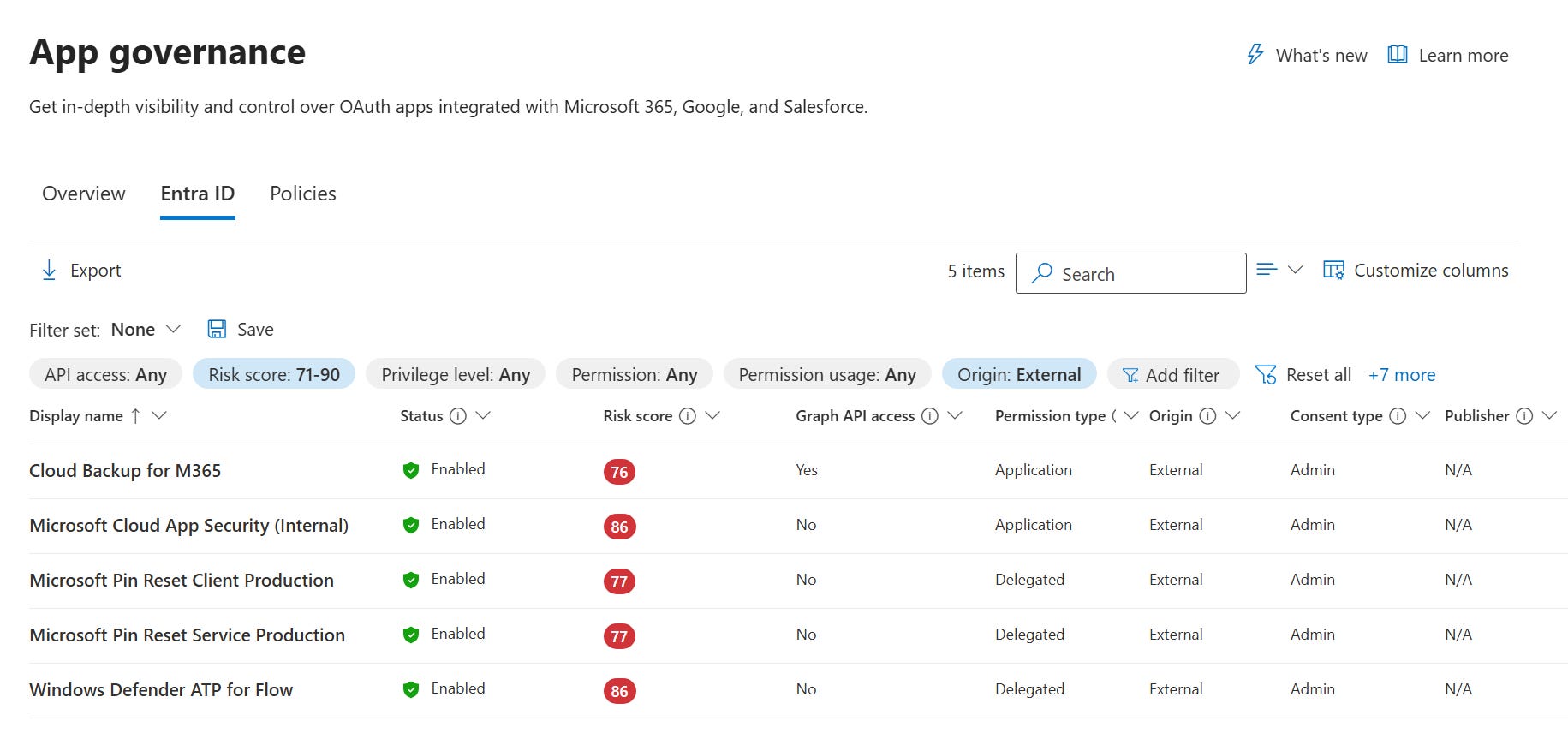
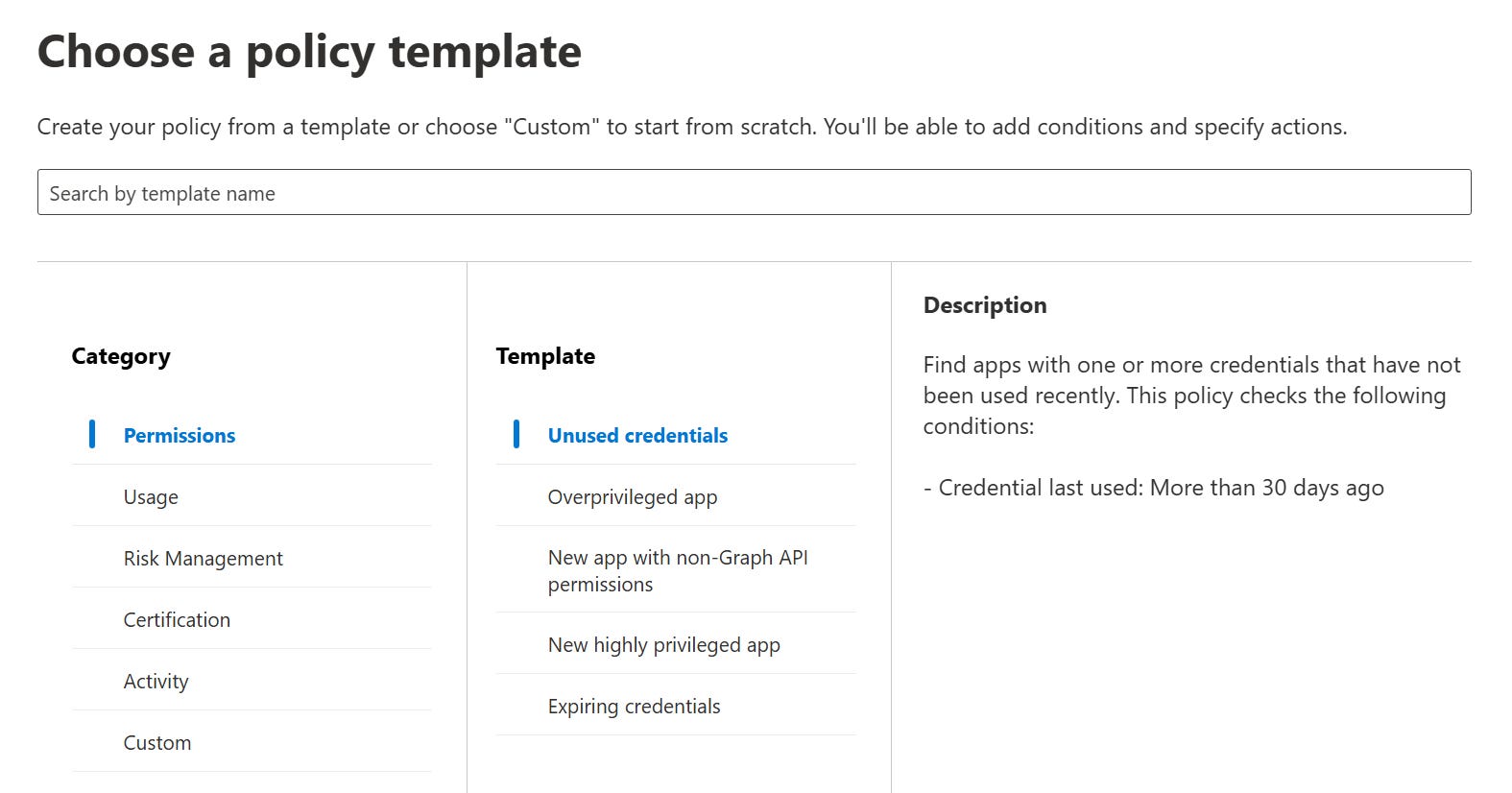
Then we can create OAuth app policies so we are notified instead of looking manually. Examples:
Apps registered in the last X days with a risk score above a threshold,
Apps that have not authenticated recently (90 days by default),
Apps with unused Microsoft Graph permissions.
For compromise signals, Microsoft Entra ID Protection can also flag risky workload identities, including multi-tenant apps.
App governance in Microsoft Defender for Cloud Apps | Microsoft Learn
Reporting: know what you have
A policy only helps if we know which applications exist. That is why I built the Entra ID App Report: a PowerShell script that generates a self-contained HTML report for every enterprise application in a tenant. For each app it shows:
Permissions, application and delegated, with admin versus user consent and links to the Graph Permissions Explorer,
Directory roles assigned to the service principal,
Owners, with gap detection between the enterprise app and the app registration,
Credentials: certificates, secrets and federated credentials, with expiring, expired and long-lived detection, and credentials added directly to the service principal,
Origin: internal, Microsoft or third-party, and whether the publisher is verified,
Creation date, with a badge for apps created in the last 30 days,
a risk score from Low to Critical, built from these signals.
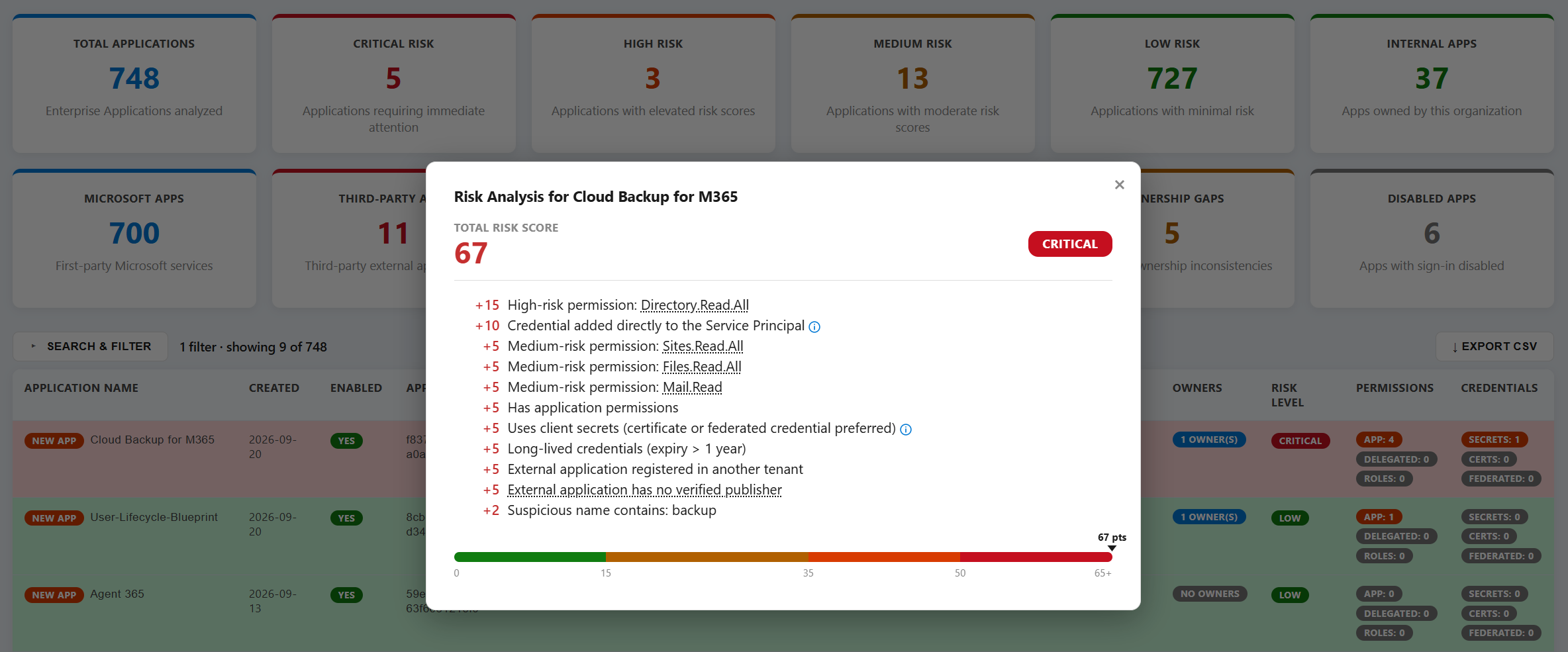
Because these things must be watched regularly, I recommend running it on a schedule. The repository includes an Azure DevOps pipeline that generates the report weekly. It authenticates through a service connection with workload identity federation, so there are no secrets stored in the pipeline. And in larger environments, where several people register and manage applications, that regular rhythm matters.
NOTE: The report is a snapshot of the configuration. It does not analyze sign-in or audit logs, so it does not replace monitoring for new credentials, role assignments and unusual app sign-ins.
More about the report and its latest version is in my earlier post: Stop Flying Blind, Take Two: A Brand New Entra ID App Report.
If you use the affected ConnectWise applications
Microsoft’s immediate actions are worth a quick read. In short: keep the affected connections disabled until ConnectWise provides restoration instructions, and do not delete the enterprise applications first, so you preserve configuration and evidence. Search by application ID rather than display name. Review every tenant where the apps were ever installed, even if the integration is no longer in use. Then review service principal sign-ins and audit records from at least October 15, and for credential additions, role assignments and consent grants.
Final Thoughts
In my experience, most environments contains applications nobody knows about, applications that are no longer used, or applications with far too many privileges. Those are the ones to find. How you find them matters less than starting. The first analysis is always painful, but it is the cheapest way to answer an uncomfortable question: would we notice if one of these apps started signing in from an address we have never seen?